

[Version]: Updated to the latest version on Fri, 29 May 2026 15:50:19 GMT (0.5.0.)
Name: CitraVR
[Genre]: Simulation, fun, casual
[Platform]: Quest, Quest 2, Quest 3, Quest Pro (all-in-one version).
[Online]: Offline alone
[Size]: 30MB
[Refresh]: 90Hz
[Language]: Multi-Chinese languages (including Chinese).
【Description】:
About this app
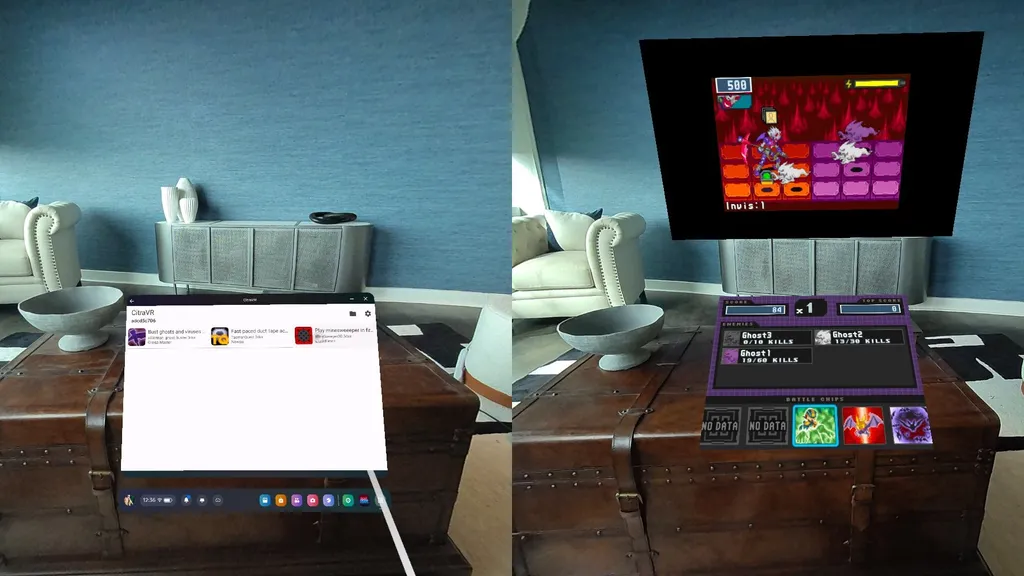
With CitraVR, you can now play Nintendo 2,3DS games natively on Meta Quest 3 and Pro. This includes a 3D view of the game, which has never looked so good. The app also has a pass-through mode, both for the screen of the 3DS. CitraVR also supports Quest controllers as well as Bluetooth controllers and USB-C wired controllers.
CitraVR takes 3DS gaming to the next level. You no longer have to hold and move your 3DS in an awkward way to enjoy those great games. You will now have a large screen with a very immersive 3D effect that appears directly on your face. I love my 3DS, but in my book, this looks much better than the 3DS itself.
I originally created this project to do a proof of concept for some of the technologies that XR developers are interested in. Specifically:
- Build hybrid 2D/3D applications
- A 2D interactive window that renders non-VR content in VR
- Use VR layers for crisp, crisp text and visuals.
The Citra 3DS emulator’s Quest-native (i.e. OpenXR, no third-party game engine) port seems like a great and fun way to demonstrate all of this at once.
The project is still small, but I’m looking for ways to improve it over time.
features
- Stereoscopic rendering
- Extensive controller support
- Large removable/resizable screen
- Playable in mixed reality
- Low-overhead ports
- Fully GPL-licensed, 100% independent of the Meta SDK
compatibility
CitraVR supports the following devices:
- Quest 2
- Quest pro
- Quest 3
Game
For a complete list of games that run well on CitraVR, visit the CitraVR compatibility list
The official latest release address: https://github.com/amwatson/CitraVR
Controllers/Inputs
CitraVR maps the Quest controller in such a way that most games on the platform can be played with the default mapping.
For games that need access to more inputs, or if players need access to more inputs faster, CitraVR also supports a variety of third-party wired USB and wireless Bluetooth controllers.
—————————————————
Use the tutorial
Download and install the emulator first, then create a new folder on your Quest, such as 3DSgames, then put the .3ds suffix game you downloaded into it, and then select the game directory after launching the emulator and you can play.
Of course, you can also use the all-in-one version of the magic fun VR assistant to create a new folder.
- $Download for freeDownload after commentDownload after login
- {{attr.name}}:
⚖️ Copyright Notice
If any game resources published on this site infringe upon your legal rights, please contact the administrator to remove the VRGoo website, Site resources are uploaded by users for personal study or testing, research, and use. Without permission from the original copyright author, use in any commercial channels is prohibited!
The resources on this site come from the internet; copyright disputes are unrelated to this site. You must completely delete the above content from your computer or other device within 24 hours of downloading. The user's statement that "does not represent the position of this site" has no relation to the site!
This site is a non-profit site. The VIP features are only for users to like the site, donate and reward, and provide technical assistance services. All content is not commercial activity.
If there is any infringement, please contact: vrgoo.org@gmail.com We will remove the product


Хорошая программа